

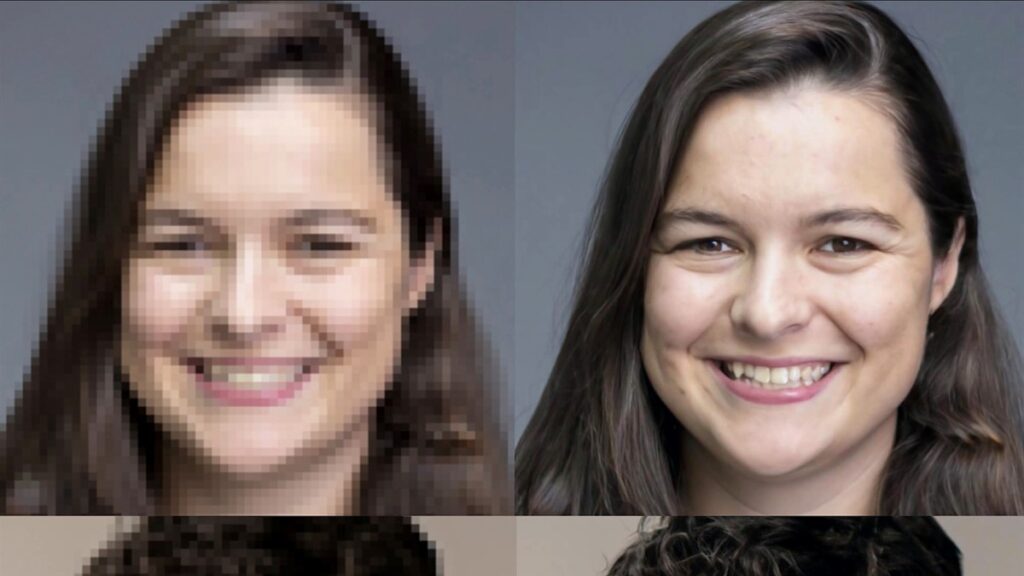
Visual content plays a central role in how people communicate, learn, and share information online. From blog posts and educational materials to product pages and social media, images help convey meaning faster than text alone. However, not all images start out at high quality. Many are taken in poor lighting, saved at low resolution, or compressed during transfer. This is where an AI image enhancer and image upscaler becomes relevant.
This article explains what AI based image enhancement and upscaling tools are, how they work, and what realistic benefits and limitations users should expect. The focus is on clear, balanced information for general readers, content creators, and professionals who want to understand these tools before relying on them in real world workflows.
What an AI Image Enhancer and Image Upscaler Is
An AI image enhancer and image upscaler is a digital tool that uses machine learning models to improve the visual quality of images. Enhancement usually refers to adjustments such as sharpening, noise reduction, color correction, and contrast improvement. Upscaling refers to increasing the resolution of an image while trying to preserve or recreate fine details.
Traditional editing software often relies on mathematical interpolation to resize images. AI based systems go further by analyzing patterns in images and predicting what higher resolution details might look like. This allows them to create results that often appear more natural and refined.
These tools are commonly available as web applications, desktop software, and mobile apps.
Why Image Quality Matters in Digital Content
Image quality influences how people perceive information. Blurry or pixelated images can reduce clarity and credibility, especially in educational, professional, or commercial settings.
Clear images support:
- Better understanding of visual details
- Improved accessibility for viewers
- Stronger engagement on digital platforms
For businesses and creators, higher quality visuals can help maintain a consistent and professional appearance across different devices and screen sizes.
How AI Image Enhancement Works
AI image enhancement systems are trained on large datasets of high and low quality images. Through training, the model learns how visual features such as edges, textures, and color patterns typically appear at different levels of clarity.
When a user uploads an image, the system analyzes it and applies learned patterns to improve sharpness, balance colors, and reduce visual noise. The process is automated and usually takes only a few seconds.
The system does not truly “see” the image as a human does. It identifies statistical patterns and applies changes based on probability and learned relationships.
Also Read: 15 Best Free AI Image Generator Tools for Stunning Visuals in 2026
How AI Image Upscaling Works
Upscaling increases the size of an image, often by two times, four times, or more. Traditional methods stretch pixels, which can result in blurry results. AI upscaling predicts what additional detail might exist between existing pixels.
For example, when enlarging a face in a photo, the system may add texture to skin or define edges around eyes and hair based on patterns it has learned from similar images.
The goal is not perfect reconstruction but a visually pleasing and believable result.
Common Use Cases for AI Image Enhancement
AI image enhancers and upscalers are used in many practical scenarios.
Content Creation and Blogging
Writers and publishers often use these tools to improve older images or resize visuals for modern displays without losing clarity.
E Commerce and Product Listings
Clear product images help customers see details more accurately. Upscaling can improve how images appear on high resolution screens.
Education and Training
Educational materials may include scanned or low quality visuals. Enhancement tools can improve readability and clarity.
Personal Photo Restoration
Users sometimes apply enhancement tools to old family photos or low quality images to make them more presentable for sharing or printing.
Advantages of Using an AI Image Enhancer and Image Upscaler
One of the main advantages is efficiency. These tools can process images quickly without requiring advanced technical skills.
Other benefits include:
- Automated improvement without manual editing
- Better results than basic resizing methods
- Support for modern high resolution displays
- Consistent visual quality across platforms
For users who do not have access to professional design software, these tools can offer a practical alternative.
Limitations and Realistic Expectations
Despite their capabilities, AI image enhancement tools have limitations.
They cannot recover details that never existed in the original image. If a photo is extremely blurry or heavily damaged, the system can only make an educated guess about what should be there.
Results may vary depending on:
- Original image quality
- Type of subject in the image
- Lighting and color conditions
Understanding these limits helps prevent unrealistic expectations.
Ethical and Transparency Considerations
AI enhanced images can sometimes appear more detailed than the original. This raises questions about representation, especially in educational, journalistic, or legal contexts.
Users should avoid presenting enhanced images as original or factual records if the changes alter important details. Transparency about the use of AI tools helps maintain trust.
Responsible use includes considering how image changes may affect interpretation.
Free and Paid AI Image Tools
Many platforms offer free versions of image enhancement and upscaling tools. These may include limits on resolution, number of images processed, or processing speed.
Paid versions often provide:
- Higher resolution output
- Batch processing
- Priority access
- Commercial use permissions
Choosing between free and paid options depends on how frequently and professionally the tool is used.
File Formats and Technical Considerations
Different file formats affect how images are stored and displayed. Common formats include JPEG, PNG, and WebP.
Upscaling tools usually allow users to download enhanced images in various formats. Choosing the right format can help balance image quality and file size, which is important for website performance.
Large images may slow down page loading if not optimized.
AI Image Tools and Website Performance
For websites, image size and quality directly influence loading speed. While upscaling improves visual clarity, it can also increase file size.
Best practices include:
- Compressing images after enhancement
- Using responsive image settings
- Choosing appropriate resolution for display size
These steps help maintain a good user experience.
Accessibility and Inclusive Design
Clear images support accessibility, especially for users with visual impairments. However, enhancement alone is not enough.
Providing descriptive alternative text for images helps screen reader users understand visual content. This practice improves both accessibility and search engine optimization.
Learning Through Experimentation
Many users find that experimenting with different images helps them understand what these tools do best. Landscapes, portraits, and text based images may all respond differently to enhancement.
Testing tools on non critical images can build confidence before applying them to important content.
Privacy and Data Awareness
When using online tools, users should be aware that images may be uploaded to external servers for processing. Reviewing privacy policies can help clarify how images are stored or deleted.
Avoid uploading sensitive or personal images unless the platform clearly explains its data handling practices.
When Professional Editing Is Still Needed
AI tools are helpful for general improvement, but they do not replace professional design or photo editing in all cases. Projects that require precise branding, color accuracy, or legal documentation often benefit from human review.
AI enhancement works best as a supportive tool rather than a complete replacement for skilled editing.
Future Developments in AI Image Technology
AI image processing continues to evolve. Researchers and developers are working on models that better understand lighting, depth, and artistic style.
Future tools may offer more control over how enhancements are applied, allowing users to fine tune results rather than relying entirely on automatic settings.
This evolution may make AI tools more adaptable to different creative and professional needs.
Choosing the Right Tool for Your Needs
Selecting an AI image enhancer and image upscaler depends on your goals.
Consider:
- How often you will use the tool
- Required image resolution
- Privacy and data policies
- Compatibility with your workflow
Taking time to compare options can lead to better long term results.
Check This: 15 Best Free AI Image Generator Tools for Stunning Visuals in 2026
Final Thoughts
An AI image enhancer and image upscaler offers a practical way to improve visual quality in a fast and accessible manner. These tools can help refresh old images, prepare visuals for modern displays, and support content creation across many fields.
At the same time, they come with technical and ethical considerations. Understanding their capabilities and limits helps users apply them responsibly and effectively.
By viewing AI image tools as assistants rather than perfect solutions, individuals and organizations can integrate them into workflows in a balanced and informed way.
