Midjourney v6 introduced a major shift in how the generative image model processes natural language prompts and advanced formatting parameters. While raw text descriptions define what appears in an image, parameters give creators precise control over composition, aspect ratios, artistic freedom, and variation output.
Mastering Midjourney parameters allows you to move away from unpredictable results and build reproducible visual workflows. This guide covers the essential syntax rules and exact values for primary v6 parameters, including --ar, --stylize, --chaos, --weird, and --quality.
Core Rules for Parameter Syntax
Midjourney parameters must strictly adhere to formatting rules. If typed incorrectly, the generation engine will either ignore the command or throw an error.
- Always Place Parameters at the End: Write your complete text prompt first, followed by your parameters.
- Use Double Dashes or Single Shorts: Parameters begin with two hyphens (e.g.,
--stylize) or a short form (e.g.,--s). - Include Proper Spacing: Leave a space between the last word of your prompt and the parameter dashes, as well as between the parameter name and its numerical value.
- No Punctuation: Do not add commas, periods, or quotes inside parameter flags.
Incorrect Syntax:
a sleek futuristic sports car--ar 16:9, --s 250.Correct Syntax:
a sleek futuristic sports car --ar 16:9 --s 250
Master Parameter Cheat Sheet
| Parameter | Short Code | Acceptable Range | Default | Primary Function |
| Aspect Ratio | --ar | Any ratio (e.g., 16:9, 9:16, 4:5) | 1:1 | Sets width-to-height dimension. |
| Stylize | --s | 0 to 1000 | 100 | Controls artistic flair vs. literal prompt matching. |
| Chaos | --c | 0 to 100 | 0 | Sets output diversity across initial 4-grid generation. |
| Weird | --w | 0 to 3000 | 0 | Introduces offbeat, quirky visual aesthetics. |
| Quality | --q | 0.25, 0.5, 1 | 1 | Adjusts render processing time and detail density. |
| Version | --v | 6, 6.1 | Current model | Locks generation engine to specific release. |
Deep Dive: Key Midjourney v6 Parameters
1. Aspect Ratio (--ar)
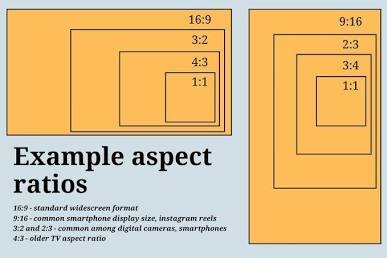
By default, Midjourney renders square outputs (1:1). Using the --ar parameter adjusts the canvas dimensions without cropping or stretching pixels post-generation.
--ar 16:9: Ideal for website banners, YouTube thumbnails, and widescreen desktop wallpapers.--ar 9:16: Optimized for mobile screens, Instagram Stories, TikTok content, and phone wallpapers.--ar 4:5: Standard vertical ratio for social media feeds and editorial photography layouts.
Example Prompt:
Plaintext
overhead view of a leather journal, fountain pen, and dried flowers on a dark wooden desk, warm tones --ar 16:9
2. Stylize (--s / --stylize)
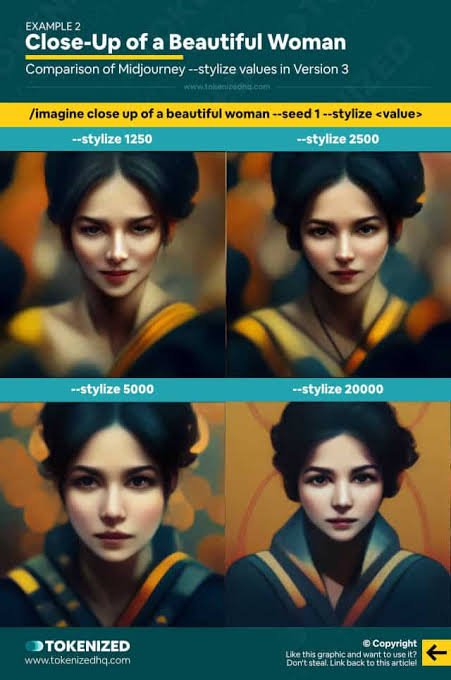
The --stylize parameter dictates how strongly Midjourney applies its default aesthetic engine, colors, and artistic composition to your image.
- Low Stylize (
--s 0to--s 50): Forces the model to strictly follow the text description without adding extra aesthetic flare. Best for photorealism, exact architectural renders, or specific product mockups. - Default Stylize (
--s 100): Offers a clean balance between prompt fidelity and artistic composition. - High Stylize (
--s 500to--s 1000): Maximizes visual richness, lighting effects, and artistic interpretation. The image will look visually striking, but may omit small details mentioned in your prompt.
Example Prompt:
Plaintext
A minimalist concrete house with floor-to-ceiling windows, dusk, light fog, architectural photography --ar 16:9 --s 250
3. Chaos (--c / --chaos)
The --chaos parameter alters how varied and distinct the 4 images in your initial generation grid will be.
--c 0(Default): Generates four subtle variations of the exact same composition and style.--c 10to--c 25: Introduces moderate composition variations while maintaining prompt theme consistency.--c 50to--c 100: Results in wildly different interpretations across all four grid quadrants, ideal for brainstorming unique visual concepts.
Example Prompt:
Plaintext
abstract flowing marble texture, deep navy and gold veins, seamless --ar 16:9 --c 30
4. Weird (--w / --weird)
Unlike --chaos, which varies the four images relative to each other, --weird introduces unconventional, surreal, or strange qualities to the prompt itself.
--w 250to--w 500: Adds subtle avant-garde visual elements.--w 1000+: Produces surreal, otherworldly visual outputs that break away from standard stock imagery aesthetics.
Negative Prompting with --no
If unwanted objects or colors consistently appear in your renders, use the --no parameter to strip specific elements out of the generation pipeline.
Plaintext
A quiet mountain lodge surrounded by pine trees, sunset lighting --no cars, buildings, people --ar 16:9
Frequently Asked Questions
Can I stack multiple parameters in one prompt?
Yes. You can combine as many parameters as needed, provided they are separated by spaces at the end of the prompt.
Example: --ar 16:9 --s 250 --c 15 --v 6.1
Does --quality 2 work in Midjourney v6?
No. In version 6, --q 2 is no longer valid. Valid values for v6 render quality are 0.25, 0.5, and 1. High-resolution upscale adjustments are performed post-generation using the interface buttons.